
Orchestration
The Orchestration section is used to define how transactions are routed and dispatched across payment channels and connectors. It enables rule-based routing, weighted dispatching, and smart retry behavior.
Figure 1: Admin – Orchestration overview
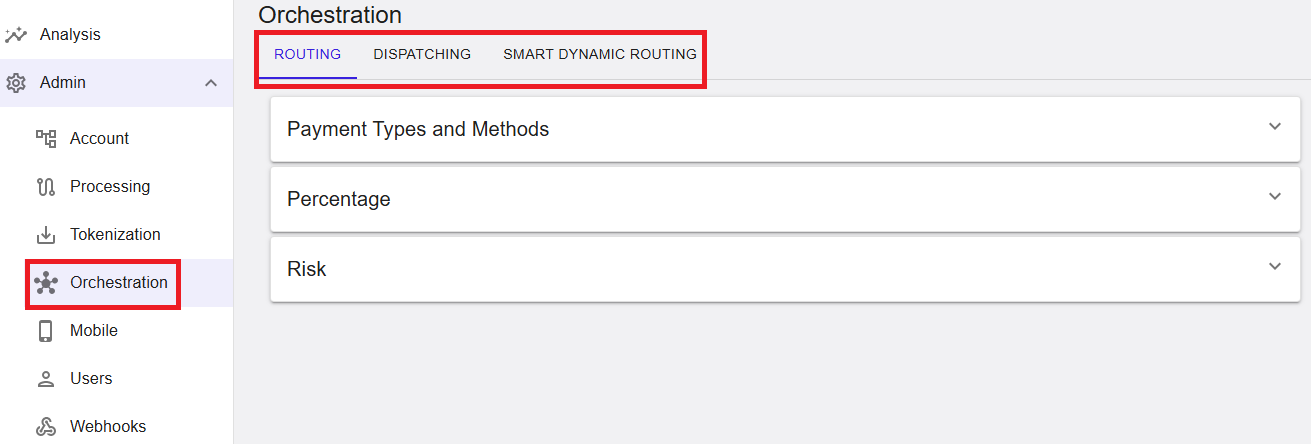
Where to find this screen
- In the left navigation menu, select Admin.
- Select Orchestration.
Orchestration Tabs
The Orchestration section is organized into the following tabs:
- ROUTING
- DISPATCHING
- SMART DYNAMIC ROUTING
Each tab provides a different orchestration strategy.
Routing
The Routing tab defines how transactions are routed to channels based on payment types, brands, percentages, and risk-related rules.
Figure 2: Routing – Payment Types and Methods
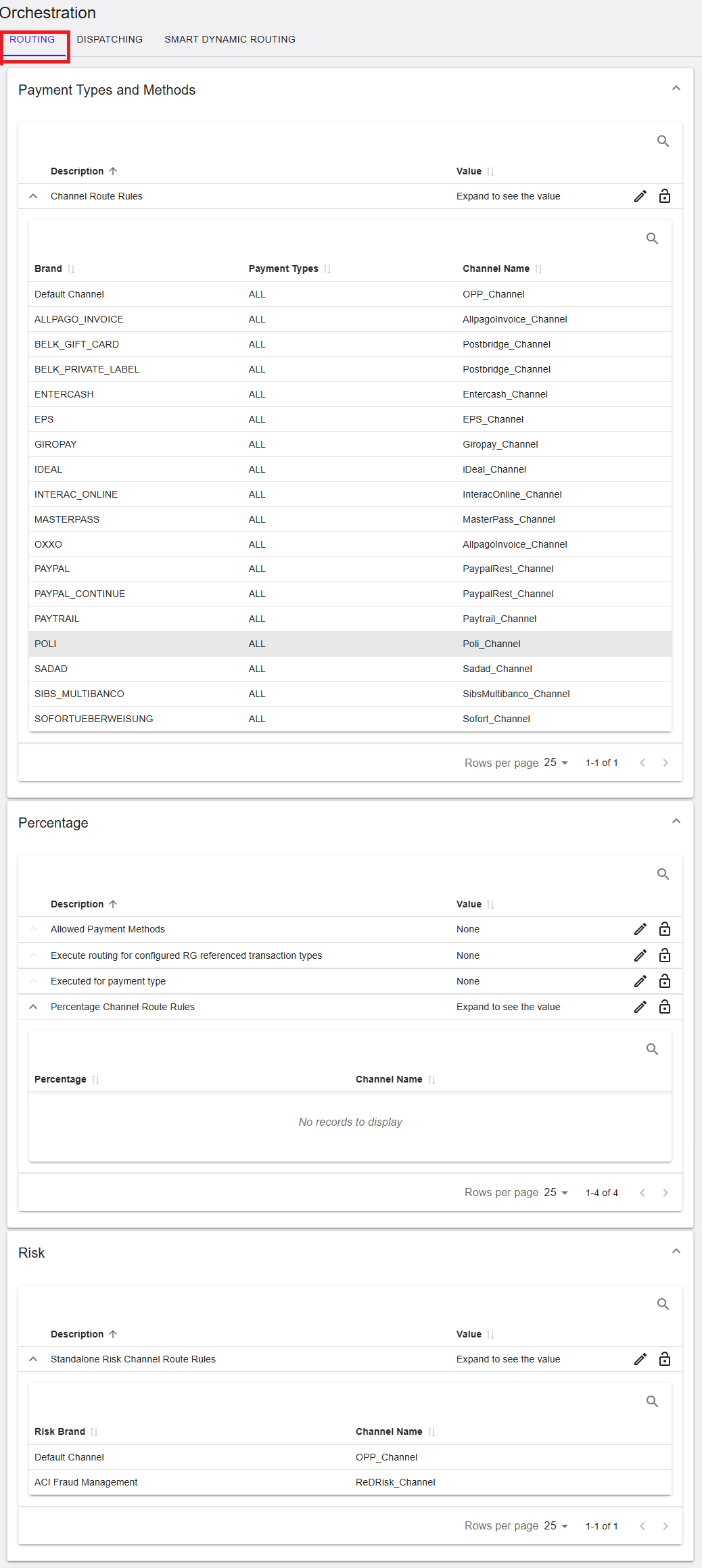
Payment Types and Methods
This section defines channel routing rules based on payment brands and payment types.
- Brand – Payment brand (for example, VISA, MASTERCARD, PAYPAL).
- Payment Types – Applicable payment types (for example, ALL).
- Channel Name – The channel used for processing.
Default and brand-specific routing rules can be defined to control how transactions are routed.
Payment Types and Methods (RiRo)
| Name | Description | Value |
|---|---|---|
| Channel Route Rules | Defines routing rules that map payment brands and payment types to processing channels. Rules are evaluated in order and the first matching rule determines the channel. | Configured rules |
Percentage Routing
The Percentage section allows routing transactions to channels based on defined percentages.
- Allowed Payment Methods – Restricts which methods are eligible.
- Execute routing for RG-referenced transactions – Controls routing behavior for referenced flows.
- Percentage Channel Route Rules – Defines percentage-based channel distribution.
If no records are shown, no percentage-based routing rules are configured.
Percentage Routing (RiRo)
| Name | Description | Value |
|---|---|---|
| Allowed Payment Methods | Payment methods eligible for percentage-based routing. | Configured list |
| Execute routing for configured RG referenced transaction types | Applies percentage routing to configured referencing transaction types. | Configured value |
| Executed for payment type | Payment types for which percentage routing is applied. | Configured value |
| Percentage Channel Route Rules | Defines traffic distribution across channels using percentage weights. | Configured rules |
Risk Routing
The Risk section defines routing rules for risk-related processing.
- Standalone Risk Channel Route Rules – Routes transactions to specific risk channels.
- Risk Brand – Risk provider or brand.
- Channel Name – Channel used for risk processing.
Risk Routing (RiRo)
| Name | Description | Value |
|---|---|---|
| Standalone Risk Channel Route Rules | Routes standalone risk transactions to channels based on the configured risk brand. | Configured rules |
Dispatching
The Dispatching tab controls how transactions are distributed between channels once routing has been applied.
Figure 3: Dispatching – BIN and Weight Dispatching
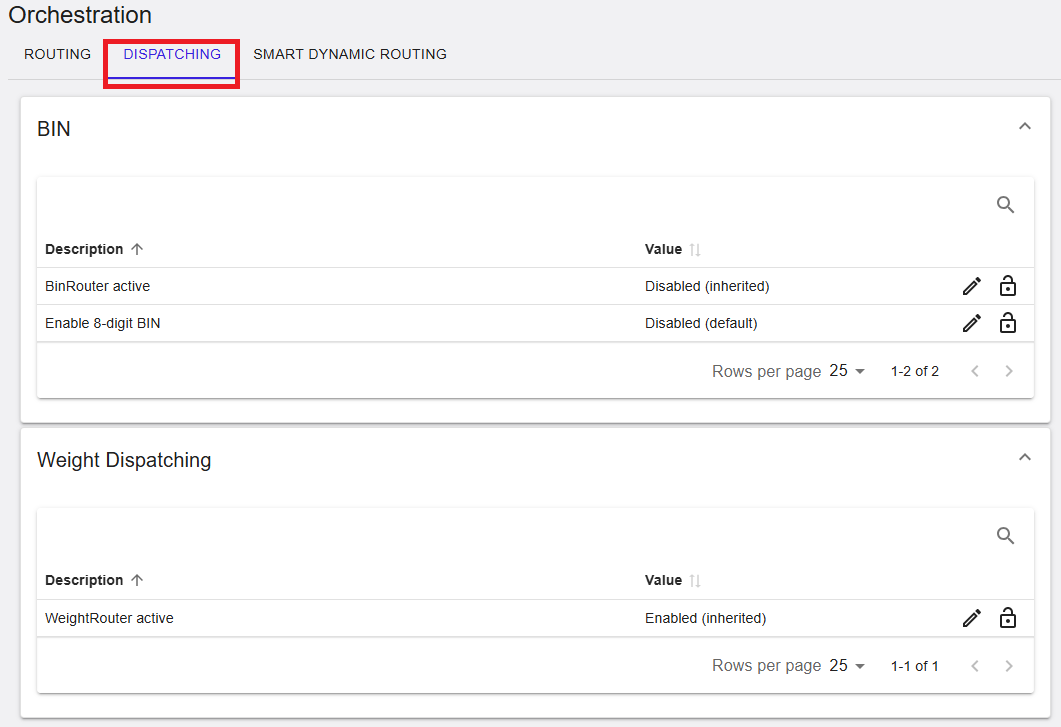
BIN Dispatching
BIN dispatching controls routing behavior based on card BIN information.
- BinRouter active – Enables or disables BIN-based routing.
- Enable 8-digit BIN – Enables support for extended BIN ranges.
BIN dispatching settings are often inherited and may not be editable at all hierarchy levels.
BIN Dispatching (RiRo)
| Name | Description | Value |
|---|---|---|
| BinRouter active | Activates BIN-based routing for this entity. | Enabled / Disabled / Inherited |
| Enable 8-digit BIN | Uses 8-digit BINs for routing and identification. | Enabled / Disabled / Inherited |
Weight Dispatching
The Weight Dispatching section distributes transactions based on defined weights.
- WeightRouter active – Enables weighted dispatching across channels.
Weight Dispatching (RiRo)
| Name | Description | Value |
|---|---|---|
| WeightRouter active | Distributes transaction traffic according to configured channel weights. | Enabled / Disabled / Inherited |
Smart Dynamic Routing
The Smart Dynamic Routing tab enables intelligent retry logic and fallback behavior for failed transactions.
Figure 4: Smart Dynamic Routing – Settings
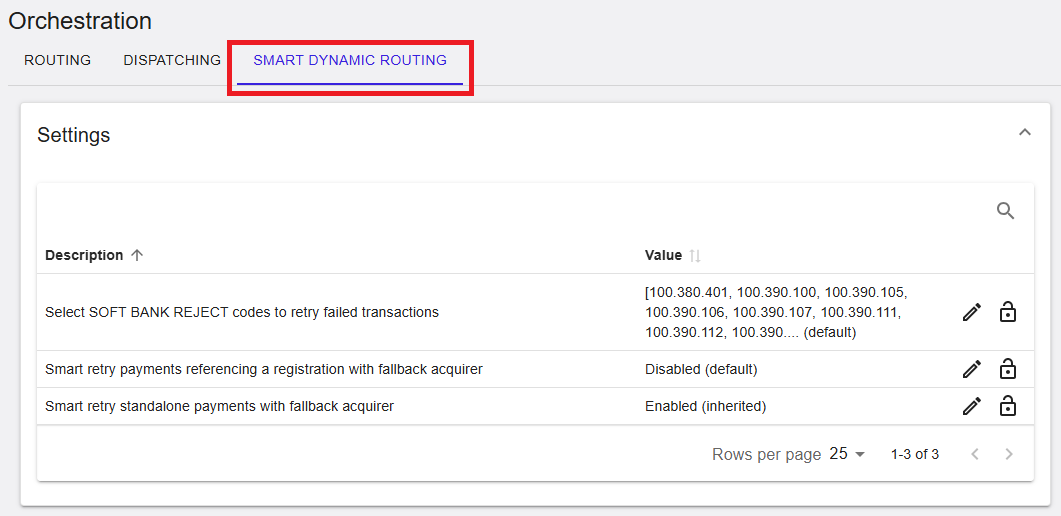
Smart Retry Settings
These settings control how failed transactions are retried using fallback acquirers or channels.
- Select SOFT BANK REJECT codes – Defines which reject codes trigger a retry.
- Smart retry payments referencing a registration – Enables retry for RG-referenced transactions.
- Smart retry standalone payments – Enables retry for standalone transactions.
Values may be Enabled, Disabled (default), or Inherited, depending on the selected hierarchy level.
Smart Dynamic Routing (RiRo)
| Name | Description | Value |
|---|---|---|
| Select SOFT BANK REJECT codes to retry failed transactions | Defines soft bank reject codes that trigger automatic retry via fallback channels. | Configured list |
| Smart retry payments referencing a registration with fallback acquirer | Retries RG-referenced payments using a fallback acquirer. | Enabled / Disabled / Inherited |
| Smart retry standalone payments with fallback acquirer | Retries standalone payments using a fallback acquirer. | Enabled / Disabled / Inherited |
Summary
The Admin → Orchestration section provides comprehensive control over transaction routing, dispatching, and retry behavior. It allows merchants and PSPs to optimize payment success rates through rule-based routing, BIN and weight dispatching, and smart dynamic retry strategies. Availability of configuration options depends on user permissions and hierarchy level.