
User Profile and Preferences
The User Preferences menu allows you to configure personal settings that control how the Merchant Portal is displayed for your user account. These settings ensure that language, time, and formatting are aligned with your operational and regional requirements.
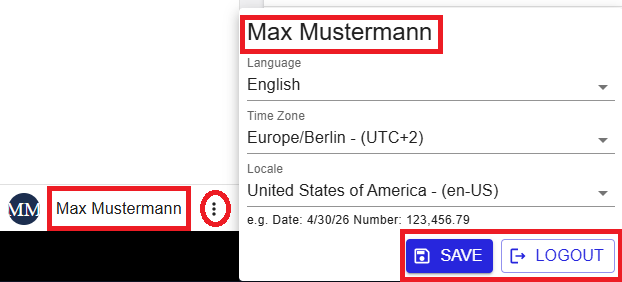
Figure 1: User profile and preferences panel
Where to find this menu
- The User Preferences menu is located in the profile section at the bottom left of the screen.
- Click the three dots icon next to your profile name to open the preferences panel.
The menu presents the following configuration options:
- Language
- Time Zone
- Locale
Language
The Language setting controls the display language of the Merchant Portal user interface.
To update the interface language:
- Open the User Preferences menu.
- In the Language field, select the required language.
- Select SAVE.
The interface is immediately translated after saving the selection.
Available languages include:
- English
- German
- French
- Italian
- Spanish
- Portuguese (Portugal)
- Portuguese (Brazil)
The user interface language is defined in the user preferences and is independent from system-generated emails, such as activation messages.
Time Zone
The Time Zone setting determines how dates and times are displayed throughout the Merchant Portal.
- All timestamps shown on screen reflect the selected time zone.
- This applies to transaction times, logs, reports, and history views.
To update the time zone:
- Open the User Preferences menu.
- In the Time Zone field, select the required value.
- Select SAVE.
Important: Set the correct time zone before reviewing transaction timestamps, as all transactions, logs, and reports reflect the selected time setting.
Locale
The Locale setting defines how dates and numbers are formatted across the application.
- Date format (for example, MM/DD/YYYY or DD.MM.YYYY)
- Number formatting, including decimal and thousands separators
To update the locale:
- Open the User Preferences menu.
- In the Locale field, select the required value.
- Select SAVE.
An example format is displayed below the selection field to preview how values (such as dates and amounts) will appear in the application.
Saving Preferences and Logout
Once you have configured your preferences:
- Select SAVE to apply your changes.
- Your settings take effect immediately across the entire application.
- Preferences are retained for future sessions each time you log back in.
To exit the Merchant Portal, select LOGOUT from the same panel.
Summary
The User Profile and Preferences menu allows you to personalize your Merchant Portal experience by configuring language, time zone, and locale settings. These preferences ensure that information is displayed clearly and consistently, supporting efficient daily operations and accurate transaction review.