
Processing – Features
The Features tab provides centralized access to feature-level configuration that influences payment processing behavior. Settings are grouped into expandable sections, each representing a specific processing feature or capability.
Figure 1: Processing – Features tab

Where to find this screen
- In the left navigation menu, select Admin.
- Select Processing.
- Select the FEATURES tab.
The Processing screen contains the tabs VALIDATION, SETTINGS, CREDENTIAL ON FILE, FEATURES, BRANDS and OTHER. The active tab is highlighted.
Payments Terminology
- ABU – Mastercard Account Billing Updater.
- API – Application Programming Interface.
- BIN – Bank Identification Number.
- DB – Debit (payment type).
- ICA – Interbank Card Association.
- IP – Internet Protocol.
- MAC – Merchant Advice Code.
- OPP – Open Payment Platform.
- PA – Preauthorization (payment type).
- PCI – Payment Card Industry.
- PSP – Payment Service Provider.
- RM.RI – Risk Management Check
- SEPA – Single Euro Payments Area.
- SFTP – SSH File Transfer Protocol.
- SMS – Short Message Service.
- Tx – Transaction.
- VAU – Visa Account Updater.
- VPC – Visa Platform Connect.
- 3D Secure – Authentication data included in responses.
Search and Actions
- The Search icon, shown at the top right of each section, can be used to locate a specific parameter.
- The Edit icon (pencil) allows updating a parameter value, subject to permissions. It is greyed out for settings that are not available on the current level.
- The Lock icon indicates that the parameter is read‑only at the current scope.
- The arrow next to Description and Value in the table header indicates sorting; the list is sorted by Description.
- The Rows per page selector and the previous/next arrows at the bottom of each section are used to page through longer lists, such as External.
Feature Sections (Expandable Panels)
The FEATURES tab is organized into expandable sections. Each section represents a feature area and contains related configuration parameters. Select the arrow on the right side of a section to expand or collapse it.
Figure 2: Processing – Features tab, all sections collapsed
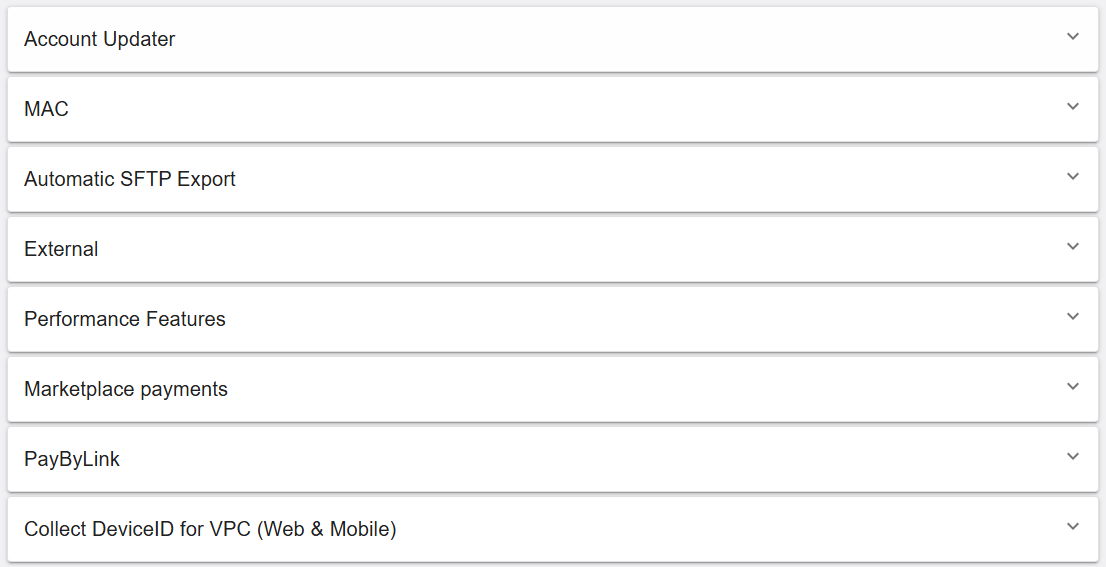
Feature areas shown:
- Account Updater – Configuration for card account updater services, such as Mastercard ABU and Visa VAU.
- MAC – MAC Control and MAC Scheduler settings (retry blocking and automatic later retry).
- Automatic SFTP Export – Settings for scheduled transaction exports via SFTP.
- External – Options that influence data included in responses and external-facing behavior.
- Performance Features – Performance-related options.
- Marketplace payments – Parameters related to marketplace payment configuration.
- PayByLink – Settings related to PayByLink.
- Collect DeviceID for VPC (Web & Mobile) – Settings related to Device ID collection for Web and Mobile.
How settings are displayed
Within an expanded section, settings are displayed as rows with the following elements:
- Description – The parameter name and its functional purpose.
- Value – The currently configured value (for example, Enabled, Disabled (default), None, Enabled (inherited) or Disabled (inherited)).
Some descriptions are followed by a grey Root only! label. This label indicates that the parameter requires special access to be configured.
Some settings may display messages such as This setting is not available on this level or Setting is inherited, but not available on this level: Enabled, indicating that the parameter cannot be configured at the current hierarchy level. For these rows the Edit (pencil) icon is greyed out.
At the bottom of each section, the number of rows per page (25) and the current range (for example, 1-9 of 9) are shown, together with previous and next page arrows.
Account Updater (RiRo)
Figure 3: Processing – Features – Account Updater
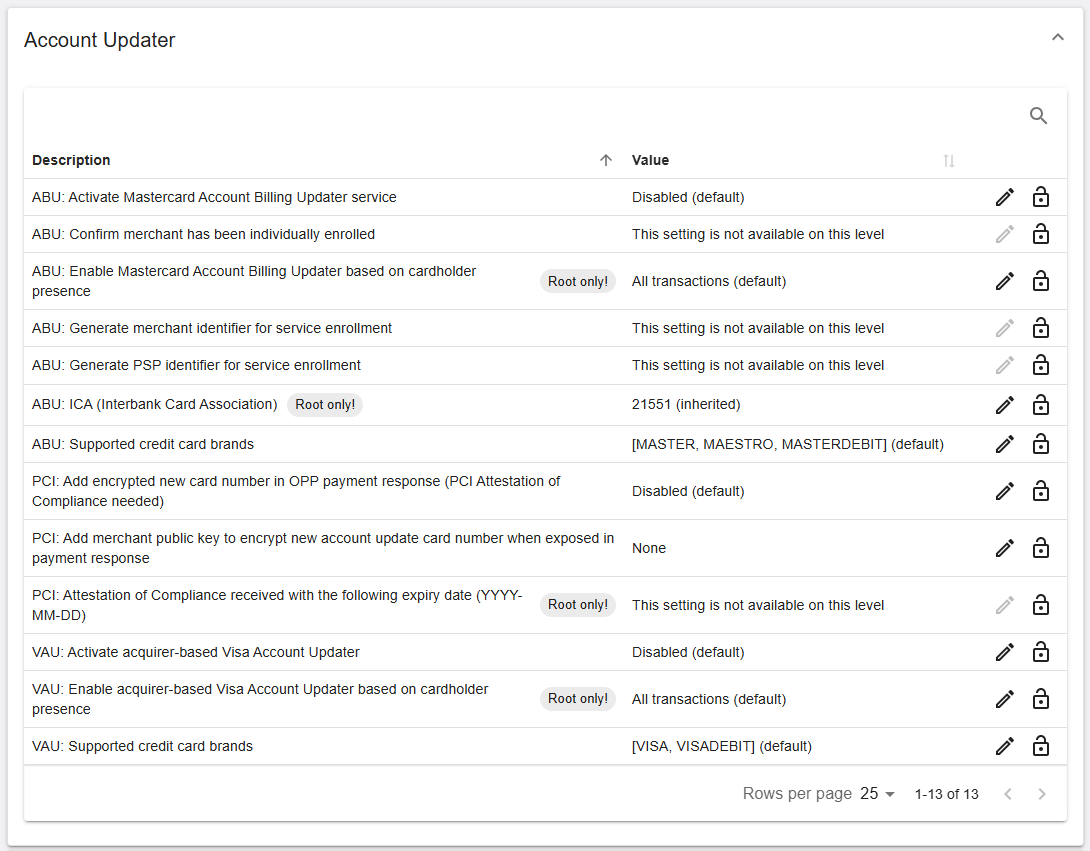
The section lists 13 settings. Settings are prefixed with ABU (Mastercard), PCI or VAU (Visa).
| Name | Description | Value |
|---|---|---|
| ABU: Activate Mastercard Account Billing Updater service | Activates the Mastercard Account Billing Updater (ABU) service to request updated card account information for stored credentials. | Disabled (default) |
| ABU: Confirm merchant has been individually enrolled | Confirms that the merchant is individually enrolled in the ABU service before processing update requests. | This setting is not available on this level |
| ABU: Enable Mastercard Account Billing Updater based on cardholder presence Root only! |
Defines for which transactions the ABU service is used, depending on cardholder presence. | All transactions (default) |
| ABU: Generate merchant identifier for service enrollment | Generates a merchant identifier used during enrollment in the ABU service. | This setting is not available on this level |
| ABU: Generate PSP identifier for service enrollment | Generates a PSP identifier used during enrollment in the ABU service. | This setting is not available on this level |
| ABU: ICA (Interbank Card Association) Root only! |
Defines the ICA (Interbank Card Association) number used for the ABU service. | 21551 (inherited) |
| ABU: Supported credit card brands | Defines the list of credit card brands eligible for account updates via the ABU service. | [MASTER, MAESTRO, MASTERDEBIT] (default) |
| PCI: Add encrypted new card number in OPP payment response (PCI Attestation of Compliance needed) | Includes an encrypted updated card number in the OPP payment response (requires PCI Attestation of Compliance). | Disabled (default) |
| PCI: Add merchant public key to encrypt new account update card number when exposed in payment response | Defines the merchant’s public key used to encrypt the updated card number when it is included in the payment response. | None |
| PCI: Attestation of Compliance received with the following expiry date (YYYY-MM-DD) Root only! |
Records the expiry date of the PCI Attestation of Compliance received. | This setting is not available on this level |
| VAU: Activate acquirer-based Visa Account Updater | Activates the acquirer-based Visa Account Updater (VAU) service for stored credentials. | Disabled (default) |
| VAU: Enable acquirer-based Visa Account Updater based on cardholder presence Root only! |
Defines for which transactions the acquirer-based VAU service is used, depending on cardholder presence. | All transactions (default) |
| VAU: Supported credit card brands | Defines the list of credit card brands eligible for account updates via the VAU service. | [VISA, VISADEBIT] (default) |
MAC (RiRo)
Figure 4: Processing – Features – MAC
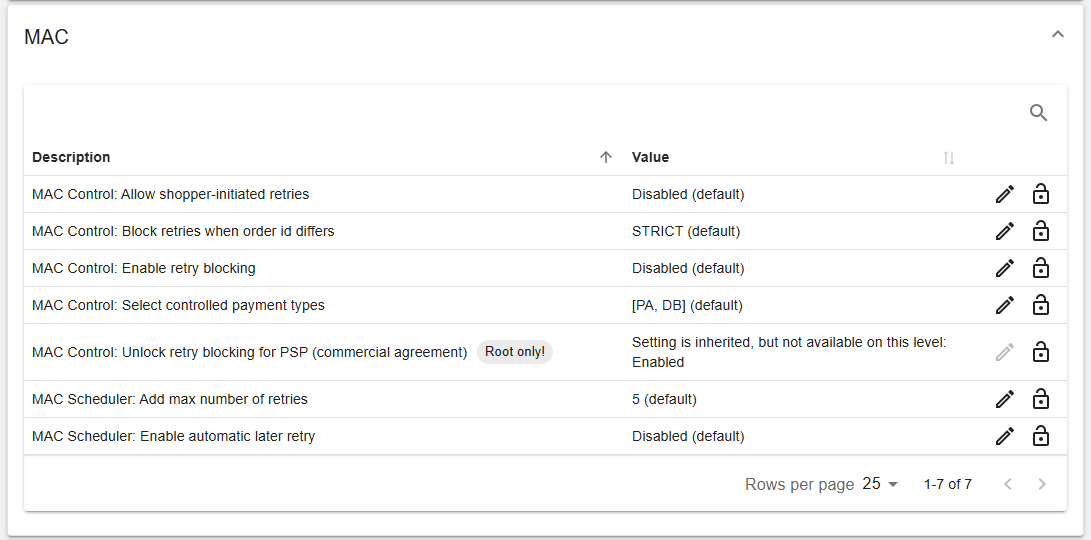
The section lists 7 settings, prefixed with MAC Control or MAC Scheduler.
| Name | Description | Value |
|---|---|---|
| MAC Control: Allow shopper-initiated retries | Controls whether retries initiated by the shopper are allowed. | Disabled (default) |
| MAC Control: Block retries when order id differs | Defines how retries are blocked when the order id differs. | STRICT (default) |
| MAC Control: Enable retry blocking | Enables the blocking of retries. | Disabled (default) |
| MAC Control: Select controlled payment types | Defines the payment types that are subject to MAC control. | [PA, DB] (default) |
| MAC Control: Unlock retry blocking for PSP (commercial agreement) Root only! |
Unlocks the retry blocking feature for the PSP (subject to a commercial agreement). | Setting is inherited, but not available on this level: Enabled |
| MAC Scheduler: Add max number of retries | Defines the maximum number of retries. | 5 (default) |
| MAC Scheduler: Enable automatic later retry | Enables automatic retry at a later time. | Disabled (default) |
Automatic SFTP Export (RiRo)
Figure 5: Processing – Features – Automatic SFTP Export
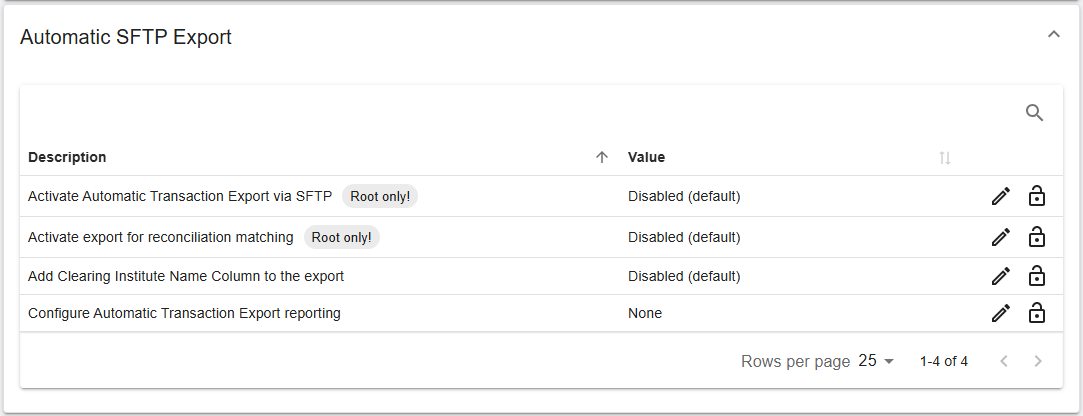
The section lists 4 settings.
| Name | Description | Value |
|---|---|---|
| Activate Automatic Transaction Export via SFTP Root only! |
Activates the scheduled export of transactions via SFTP. | Disabled (default) |
| Activate export for reconciliation matching Root only! |
Activates the export used for reconciliation matching. | Disabled (default) |
| Add Clearing Institute Name Column to the export | Adds a column containing the clearing institute name to SFTP export files. | Disabled (default) |
| Configure Automatic Transaction Export reporting | Defines the report configuration used for scheduled transaction exports. | None |
External (RiRo)
The section lists 36 settings. With 25 rows per page, the settings are spread over two pages; use the page arrows at the bottom of the section to switch between them.
Figure 6: Processing – Features – External (first part of the list)
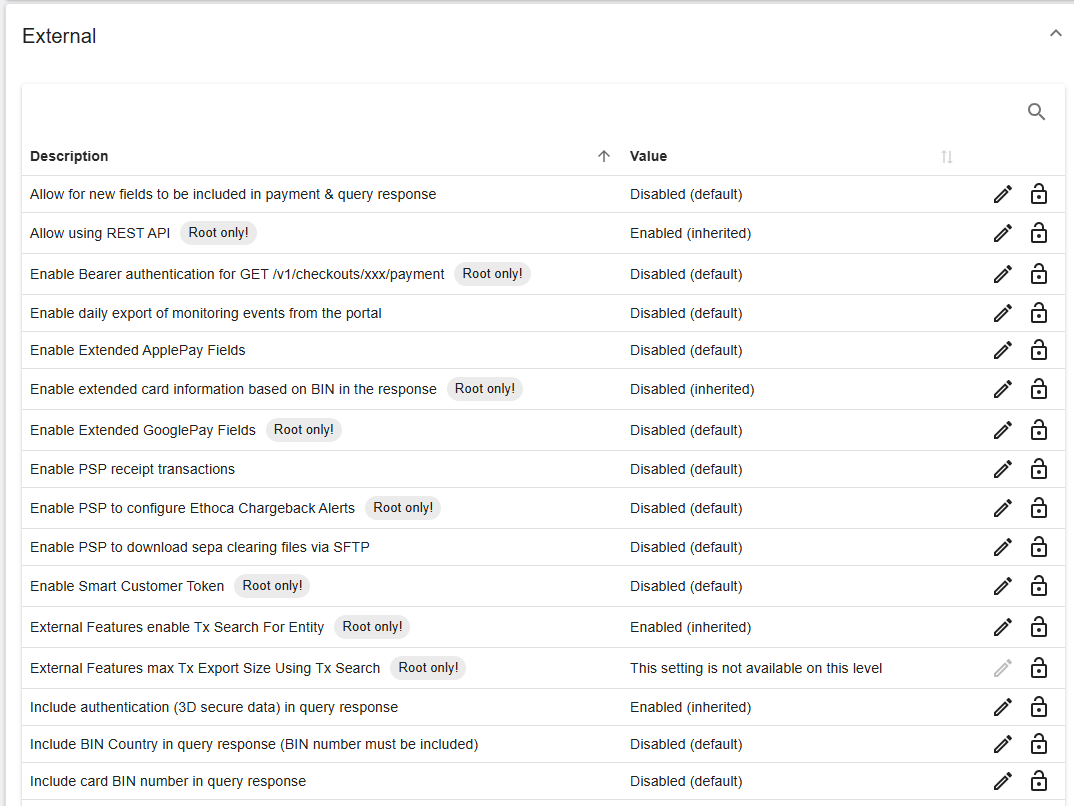
Figure 7: Processing – Features – External (second part of the list)
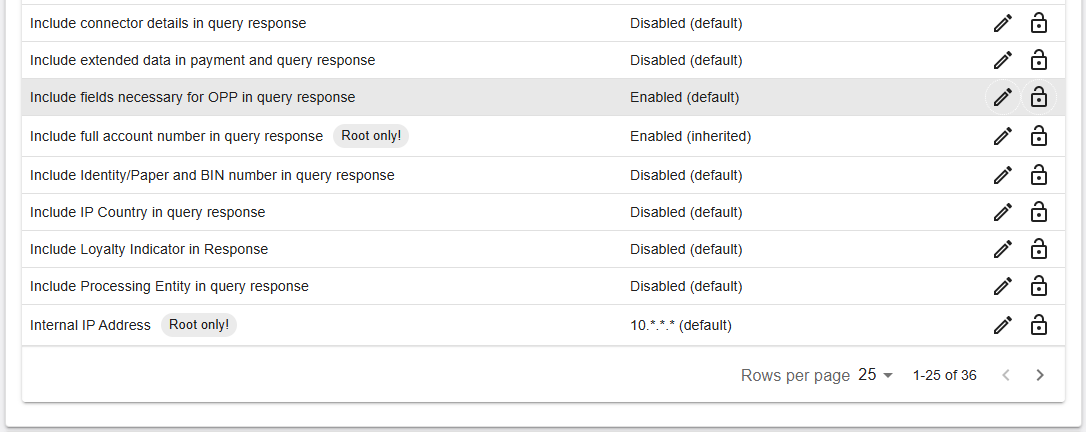
Figure 7 shows the rows that follow Figure 6, up to the end of the first page (1-25 of 36).
| Name | Description | Value |
|---|---|---|
| Allow for new fields to be included in payment & query response | Allows new fields to be included in payment and query responses. | Disabled (default) |
| Allow using REST API Root only! |
Allows the use of the REST API. | Enabled (inherited) |
| Enable Bearer authentication for GET /v1/checkouts/xxx/payment Root only! |
Enables Bearer authentication for the GET /v1/checkouts/xxx/payment request. | Disabled (default) |
| Enable daily export of monitoring events from the portal | Generates a daily export of monitoring events from the portal. | Disabled (default) |
| Enable Extended ApplePay Fields | Enables extended Apple Pay fields. | Disabled (default) |
| Enable extended card information based on BIN in the response Root only! |
Includes extended card information, based on the BIN, in the response. | Disabled (inherited) |
| Enable Extended GooglePay Fields Root only! |
Enables extended Google Pay fields. | Disabled (default) |
| Enable PSP receipt transactions | Enables PSP receipt transactions. | Disabled (default) |
| Enable PSP to configure Ethoca Chargeback Alerts Root only! |
Allows the PSP to configure Ethoca Chargeback Alerts. | Disabled (default) |
| Enable PSP to download sepa clearing files via SFTP | Allows PSPs to retrieve SEPA clearing files via SFTP. | Disabled (default) |
| Enable Smart Customer Token Root only! |
Enables the Smart Customer Token feature. | Disabled (default) |
| External Features enable Tx Search For Entity Root only! |
Enables transaction search for an entity in the external features. | Enabled (inherited) |
| External Features max Tx Export Size Using Tx Search Root only! |
Defines the maximum size of a transaction export made using transaction search. | This setting is not available on this level |
| Include authentication (3D secure data) in query response | Includes 3D Secure authentication data in transaction query responses. | Enabled (inherited) |
| Include BIN Country in query response (BIN number must be included) | Includes the country derived from the card BIN in query responses. The BIN number must also be included. | Disabled (default) |
| Include card BIN number in query response | Includes the card BIN number in transaction query responses. | Disabled (default) |
| Include connector details in query response | Includes connector-specific information in query responses. | Disabled (default) |
| Include extended data in payment and query response | Includes extended data fields in payment and query responses. | Disabled (default) |
| Include fields necessary for OPP in query response | Includes OPP-required fields in transaction query responses. | Enabled (default) |
| Include full account number in query response Root only! |
Includes the full account number in query responses. | Enabled (inherited) |
| Include Identity/Paper and BIN number in query response | Includes identity or paper payment data and BIN number in query responses. | Disabled (default) |
| Include IP Country in query response | Includes the shopper IP-derived country in query responses. | Disabled (default) |
| Include Loyalty Indicator in Response | Includes a loyalty or rewards indicator in transaction responses. | Disabled (default) |
| Include Processing Entity in query response | Includes the processing entity identifier in query responses. | Disabled (default) |
| Internal IP Address Root only! |
Defines the internal IP address (range). | 10.*.*.* (default) |
Performance Features
Figure 8: Processing – Features – Performance Features
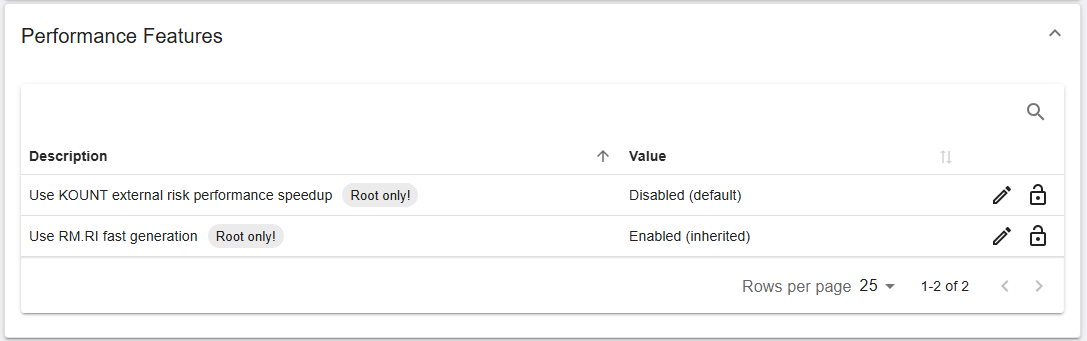
The section lists 2 settings.
| Name | Description | Value |
|---|---|---|
| Use KOUNT external risk performance speedup Root only! |
Enables the performance speedup for the KOUNT external risk integration. | Disabled (default) |
| Use RM.RI fast generation Root only! |
Enables fast generation of RM.RI. | Enabled (inherited) |
Marketplace Payments (RiRo)
Figure 9: Processing – Features – Marketplace payments
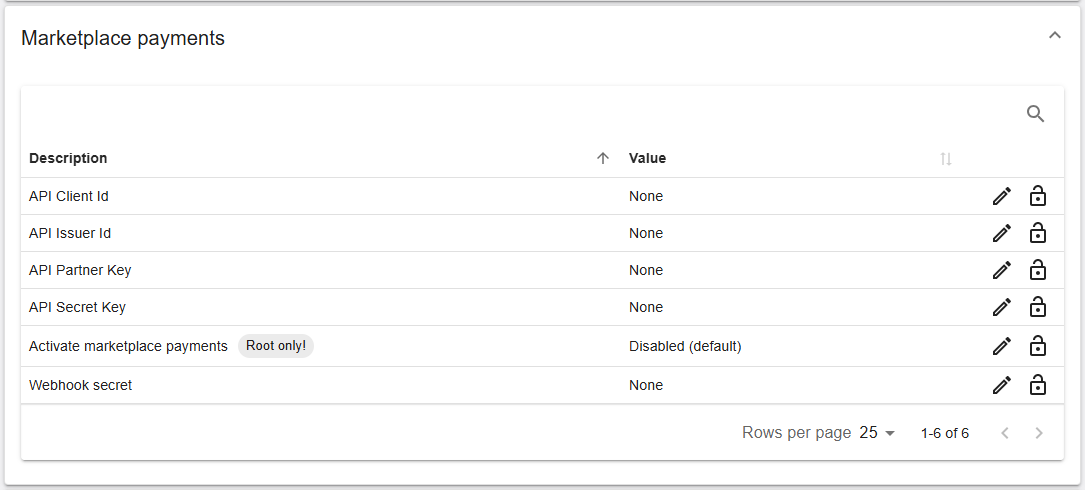
The section lists 6 settings.
| Name | Description | Value |
|---|---|---|
| API Client Id | API Client ID used to authenticate Marketplace Payments requests. | None |
| API Issuer Id | API Issuer ID identifying the issuing entity in Marketplace Payments. | None |
| API Partner Key | API Partner Key used to authenticate the Marketplace Payments partner. | None |
| API Secret Key | Secret key used to sign Marketplace Payments requests. | None |
| Activate marketplace payments Root only! |
Activates Marketplace Payments. | Disabled (default) |
| Webhook secret | Secret used to validate webhook notifications from Marketplace Payments. | None |
PayByLink
Figure 10: Processing – Features – PayByLink
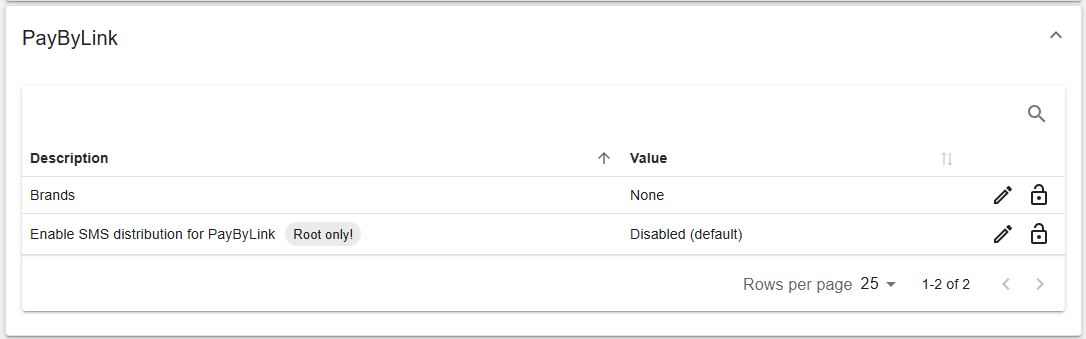
The section lists 2 settings.
| Name | Description | Value |
|---|---|---|
| Brands | Defines the brands configured for PayByLink. | None |
| Enable SMS distribution for PayByLink Root only! |
Enables the distribution of PayByLink via SMS. | Disabled (default) |
Collect DeviceID for VPC (Web & Mobile)
Figure 11: Processing – Features – Collect DeviceID for VPC (Web & Mobile)
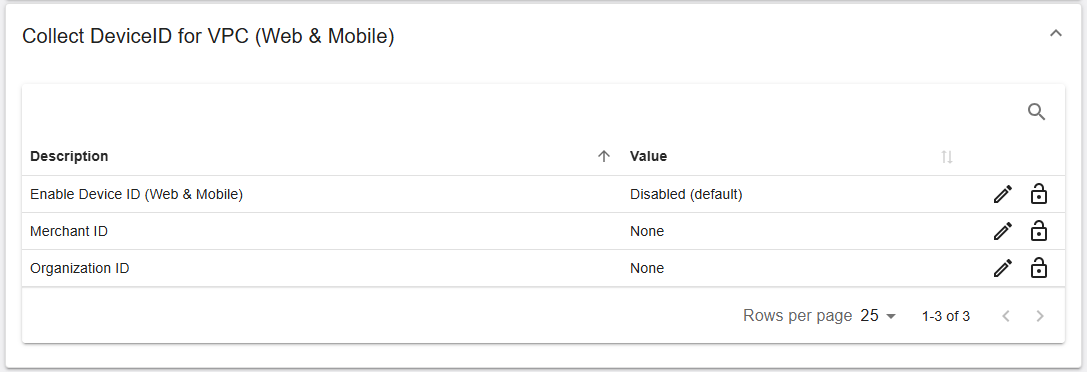
The section lists 3 settings.
| Name | Description | Value |
|---|---|---|
| Enable Device ID (Web & Mobile) | Enables the collection of the Device ID for Web and Mobile. | Disabled (default) |
| Merchant ID | Merchant ID used for Device ID collection. | None |
| Organization ID | Organization ID used for Device ID collection. | None |
Summary
The Processing → Features tab provides structured, feature‑based configuration that can impact payment processing behavior. Use the expandable sections to locate the relevant feature area and review or update settings where permitted. Availability of settings and edit actions depends on your assigned permissions and the selected hierarchy level.