
Back Office Operations
Overview
Back Office Operations are actions performed on a transaction after the original payment processing has been completed. These operations allow users to manage and adjust transactions directly from the Transaction Details view.
Depending on the transaction type and user permissions, operations such as Refund, Reversal, or Capture may be available.
Figure 1: Back Office Operations in Transaction Details
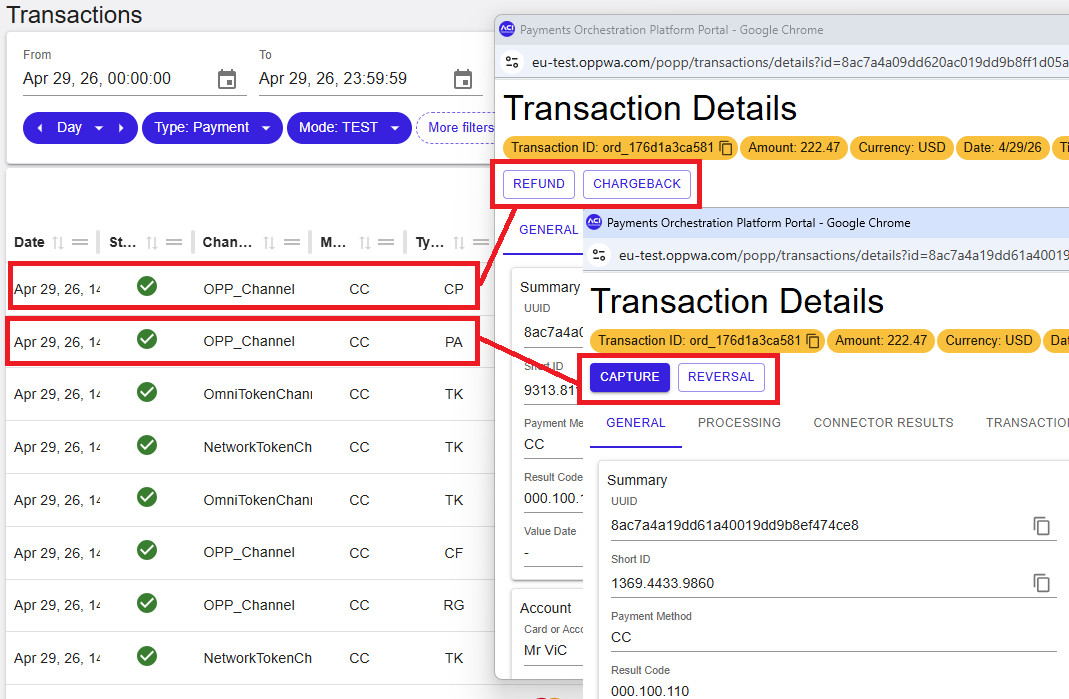
How to access back office operations
- Open the Transactions view.
- Search for the required transaction.
- Select the transaction to open the Transaction Details view.
- Check whether action buttons are available for the selected transaction.
Back office operation availability
The availability of back office operations depends on the following:
- Transaction type
- Transaction status
- User role permissions
| Transaction Type | Available Operations |
|---|---|
| Pre-Authorization | Capture, Reversal |
| Capture | Refund, Chargeback |
| Debit | Rebuild, Refund, Chargeback |
| Chargeback | Chargeback Reversal |
| Refund | No operations available |
Performing a back office operation
To perform a back office operation:
- Open the Transaction Details view.
- Select an available operation (for example, Refund or Capture).
- Review or enter the required values in the dialog.
- Select Submit.
The operation dialog can include the following fields:
- Amount
- Usage
- Transaction ID
- Memo
If the operation is successful, a confirmation is displayed and key values can be copied, such as the generated transaction UUID and the submitted Transaction ID.
Refund
A Refund returns funds to the customer after a transaction has been successfully processed.
Refund is typically available for:
- Capture transactions
- Debit transactions
The refund operation is initiated from the Transaction Details view when available.
Reversal (Cancel)
A Reversal cancels a previously authorised transaction before further processing takes place.
Reversal is typically available for:
- Pre-Authorization transactions
The reversal operation is initiated from the Transaction Details view when available.
Capture
A Capture completes the processing of a previously authorised transaction.
Capture is typically available for:
- Pre-Authorization transactions
The capture operation is initiated from the Transaction Details view when available, and requires completing the operation dialog before submission.
Summary
Back Office Operations enable users to manage transactions after processing by performing actions such as refunds, reversals, and captures. Availability depends on transaction type, status, and user permissions.